

GetResponse vs ActiveCampaign is a comparison many marketers and business owners are searching for when choosing the right email marketing tool in 2026. Both platforms offer powerful features for email campaigns, automation, and audience growth, but they differ significantly in usability, pricing, and advanced capabilities. In this guide, we’ll clearly compare GetResponse and ActiveCampaign to help you decide which one best fits your business needs.
Ease of Use and User Interface
When comparing GetResponse vs ActiveCampaign, ease of use is one of the biggest deciding factors—especially for beginners and small teams.
GetResponse is designed with simplicity in mind. The dashboard is clean, well-organized, and beginner-friendly. Most features like email campaigns, automation, landing pages, and forms are accessible from a single left-hand menu. Creating an email or automation workflow takes just a few clicks, and the drag-and-drop editors are intuitive even if you have no prior experience with email marketing tools.
In contrast, ActiveCampaign offers a more powerful but complex interface. While the dashboard looks modern, it can feel overwhelming at first. There are more menus, options, and settings—especially around automation and CRM features. This gives advanced users greater control, but beginners may need time to understand how everything connects.
For daily tasks like creating campaigns, managing contacts, and checking reports:
- GetResponse is faster and easier to navigate
- ActiveCampaign requires a learning curve but rewards experienced users with deeper customization
Overall, in the GetResponse vs ActiveCampaign ease-of-use comparison:
- GetResponse is better for beginners, solopreneurs, and small businesses
- ActiveCampaign is better for advanced marketers and teams needing complex workflows
If ease of use and quick setup are your top priorities, GetResponse clearly has the advantage. If you’re willing to invest time in learning a more advanced system, ActiveCampaign offers greater long-term flexibility.
Email Campaign Builder Comparison
In the GetResponse vs ActiveCampaign comparison, the email campaign builder is a key feature because it directly affects how fast and effectively you can create and send emails.
GetResponse offers a highly intuitive drag-and-drop email builder. Users can choose from a large library of professionally designed templates and customize them easily without any technical skills. Elements like text blocks, images, buttons, and dividers can be added or edited with simple clicks. The editor is responsive, meaning emails automatically adapt well to mobile devices.
ActiveCampaign also provides a drag-and-drop email builder, but it is slightly more advanced and complex. While it offers strong customization options and dynamic content features, the editor can feel less straightforward for beginners. Small changes may take more steps, especially when working with conditional or personalized content.
When it comes to core builder features:
- GetResponse focuses on speed, simplicity, and visual design
- ActiveCampaign focuses on advanced personalization and control
Both platforms support personalization tags, saved content blocks, and reusable templates. However, GetResponse makes it easier to create good-looking campaigns quickly, while ActiveCampaign shines when building highly targeted, data-driven emails.
In summary, for the GetResponse vs ActiveCampaign email builder comparison:
- GetResponse is ideal for quick campaign creation and ease of use
- ActiveCampaign is better for advanced personalization and complex email strategies
Your choice depends on whether you value simplicity or deep customization in your email campaigns.
Marketing Automation Features
In the GetResponse vs ActiveCampaign comparison, marketing automation is where the biggest differences between the two platforms become clear.
GetResponse offers a visual automation builder that is easy to understand and quick to use. You can create workflows based on common triggers such as email opens, link clicks, form submissions, purchases, and tagging. The automation templates make it simple for beginners to set up welcome emails, lead nurturing sequences, and basic sales funnels without much learning time.
ActiveCampaign, on the other hand, is known for having one of the most powerful automation engines in the email marketing space. It supports advanced triggers, conditions, and actions, including deep CRM-based automations, lead scoring, and behavior-driven workflows. You can build highly complex automation paths that react in real time to user behavior across multiple channels.
Key differences in automation:
- GetResponse is ideal for simple to moderately complex automations
- ActiveCampaign excels at advanced, multi-step, data-driven automations
While GetResponse focuses on ease of setup and clarity, ActiveCampaign provides more control for businesses that need detailed automation logic. However, this added power also comes with a steeper learning curve.
In the GetResponse vs ActiveCampaign automation comparison:
- Choose GetResponse if you want fast setup and easy automation management
- Choose ActiveCampaign if your business relies heavily on complex workflows, CRM automation, and advanced segmentation
Both platforms are strong, but they serve different levels of automation needs.
CRM and Contact Management
When comparing GetResponse vs ActiveCampaign, CRM and contact management is an area where the two platforms differ significantly in depth and purpose.
GetResponse includes basic contact management features designed mainly for email marketing. You can store contacts, apply tags, create lists, track user activity, and segment subscribers based on behavior. It also offers a lightweight CRM view where you can see contact details, campaign history, and engagement data. For most small businesses and marketers, this level of contact management is more than sufficient.
ActiveCampaign, however, provides a fully built-in CRM that goes beyond email marketing. It allows you to manage deals, sales pipelines, tasks, notes, and lead scoring directly inside the platform. Contacts can automatically move through pipelines based on automation rules, making it a strong choice for sales-driven teams and businesses that rely on structured follow-ups.
Key differences in CRM capabilities:
- GetResponse focuses on email-centric contact management
- ActiveCampaign offers a full sales CRM with deep automation
In the GetResponse vs ActiveCampaign CRM comparison:
- GetResponse works well for content creators, bloggers, and small businesses
- ActiveCampaign is better suited for B2B companies, agencies, and sales teams
If your main goal is managing email subscribers efficiently, GetResponse keeps things simple. If you need advanced lead tracking and sales pipeline automation, ActiveCampaign clearly stands out.
Segmentation and Audience Targeting
In the GetResponse vs ActiveCampaign comparison, segmentation and audience targeting play a major role in how personalized and effective your email campaigns can be.
GetResponse offers straightforward segmentation tools that are easy to use. You can segment contacts based on common criteria such as email activity (opens, clicks), signup source, location, tags, custom fields, and purchase behavior. The segment builder is visual and simple, making it easy for beginners to create targeted lists without technical knowledge.
ActiveCampaign takes segmentation to a more advanced level. It allows you to build highly detailed segments using multiple conditions, nested rules, and real-time behavioral data. You can combine website visits, in-app events, CRM data, lead scores, and past campaign behavior to target contacts with extreme precision.
Key differences in segmentation:
- GetResponse is ideal for basic to moderate audience targeting
- ActiveCampaign excels at advanced, behavior-driven segmentation
In the GetResponse vs ActiveCampaign segmentation comparison:
- GetResponse works best for small businesses, bloggers, and email-first marketers
- ActiveCampaign is better for data-driven teams and advanced automation strategies
If you want quick and easy audience targeting, GetResponse keeps things simple. If your campaigns depend on complex user behavior and CRM data, ActiveCampaign provides more control and flexibility.
Email Deliverability and Performance
In the GetResponse vs ActiveCampaign comparison, email deliverability and performance are critical because even the best campaigns fail if emails do not reach the inbox.
GetResponse has a strong reputation for reliable deliverability. It provides built-in tools such as domain authentication (SPF, DKIM), spam testing, and list hygiene features to help maintain sender reputation. Performance metrics like open rates, click-through rates, and bounce rates are clearly displayed, making it easy for users to monitor campaign health.
ActiveCampaign is also known for excellent deliverability, especially for advanced users who actively manage their lists and automations. It offers detailed engagement tracking, predictive sending, and advanced reporting features that help optimize when and how emails are delivered. ActiveCampaign’s deep data tracking allows marketers to fine-tune campaigns for better long-term inbox placement.
Key differences in deliverability and performance:
- GetResponse focuses on simplicity and consistent inbox placement
- ActiveCampaign offers advanced optimization and performance insights
In the GetResponse vs ActiveCampaign deliverability comparison:
- GetResponse is ideal for users who want dependable results with minimal setup
- ActiveCampaign is better for experienced marketers focused on performance optimization
Both platforms perform well, but your results will ultimately depend on list quality, email content, and sending practices.
Integrations and Third-Party Apps
In the GetResponse vs ActiveCampaign comparison, integrations and third-party apps matter because they determine how well each platform fits into your existing marketing and sales stack.
GetResponse offers a solid range of native integrations with popular tools such as WordPress, Shopify, WooCommerce, PayPal, Stripe, Facebook Ads, and Google Analytics. It also supports integrations through Zapier, allowing you to connect with hundreds of additional apps. For most small businesses and online marketers, these integrations cover all essential needs without extra complexity.
ActiveCampaign stands out with a much larger and deeper integration ecosystem. It integrates seamlessly with CRM tools, e-commerce platforms, customer support software, webinar tools, analytics platforms, and advertising networks. ActiveCampaign’s integrations are especially powerful when combined with its automation engine, allowing data from external tools to trigger complex workflows.
Key differences in integrations:
- GetResponse focuses on essential, easy-to-set-up integrations
- ActiveCampaign provides extensive and advanced integration options
In the GetResponse vs ActiveCampaign integrations comparison:
- GetResponse is ideal for content creators, e-commerce beginners, and small teams
- ActiveCampaign is better suited for businesses with complex tech stacks and advanced automation needs
If you want quick connections without much setup, GetResponse keeps things simple. If you rely on multiple tools working together through automation, ActiveCampaign offers greater flexibility.
Landing Pages and Conversion Tools
In the GetResponse vs ActiveCampaign comparison, landing pages and conversion tools are important for turning visitors into leads and customers without relying on external software.
GetResponse stands out in this area. It includes a built-in landing page builder with a wide selection of templates designed for lead generation, sales pages, webinars, and opt-in forms. The drag-and-drop editor is beginner-friendly, and pages are mobile-responsive by default. GetResponse also offers conversion funnels that guide users from signup to email automation in one connected workflow.
ActiveCampaign does not offer a full landing page builder in the same way. Instead, it focuses on forms, site tracking, and deep integration with third-party landing page tools. While you can create embedded forms and pop-ups for lead capture, most users rely on external tools like WordPress, Unbounce, or Leadpages to build complete landing pages.
Key differences in conversion tools:
- GetResponse provides an all-in-one landing page and funnel solution
- ActiveCampaign relies on integrations for landing pages but excels in follow-up automation
In the GetResponse vs ActiveCampaign conversion tools comparison:
- GetResponse is ideal for marketers who want everything in one platform
- ActiveCampaign is better for businesses using advanced third-party landing page tools
If you want to create landing pages and manage email follow-ups from a single dashboard, GetResponse has a clear advantage. If you already use dedicated landing page software and want powerful automation behind it, ActiveCampaign fits well.
Analytics and Reporting
In the GetResponse vs ActiveCampaign comparison, analytics and reporting determine how well you can measure performance and improve future campaigns.
GetResponse provides easy-to-understand reporting dashboards that focus on core email marketing metrics. You can quickly track open rates, click-through rates, bounces, unsubscribes, and conversions. Reports are visually clean and beginner-friendly, making it simple to understand what’s working and what needs improvement without digging through complex data.
ActiveCampaign offers more advanced and detailed reporting features. In addition to standard email metrics, it tracks automation performance, contact-level engagement, goal completion, and sales-related data through its CRM. These insights are especially useful for businesses that want to analyze the full customer journey from first interaction to conversion.
Key differences in analytics:
- GetResponse focuses on clarity and simplicity
- ActiveCampaign delivers deep, data-rich insights
In the GetResponse vs ActiveCampaign analytics comparison:
- GetResponse is ideal for marketers who want quick, actionable reports
- ActiveCampaign is better for data-driven teams that need detailed performance analysis
Both platforms provide strong analytics, but the right choice depends on how deeply you want to analyze and optimize your campaigns.
ActiveCampaign Pricing
When comparing GetResponse vs ActiveCampaign, understanding ActiveCampaign’s pricing structure is essential—especially since it’s one of the biggest differences between the two platforms.
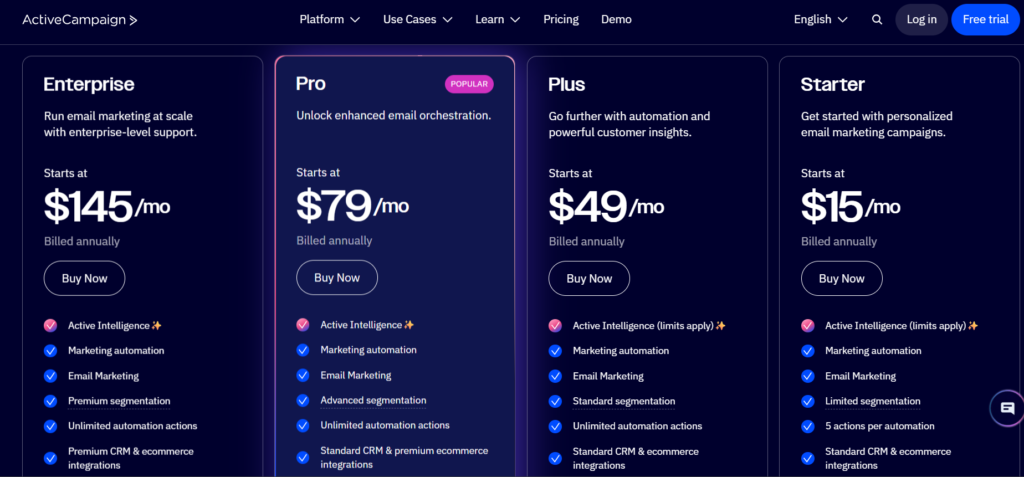
ActiveCampaign uses a tiered pricing model based on plan level and the size of your contact list. There is no permanent free plan, but you can try most features with a 14-day free trial.
Here’s a quick breakdown of the main ActiveCampaign pricing tiers
- Starter – Begins at around $15 per month for up to 1,000 contacts. This entry plan includes basic email campaigns, simple automations, templates, forms, and essential reporting.
- Plus – Starts at around $49 per month for up to 1,000 contacts and adds deeper automation, CRM features, lead scoring, integrations, and landing pages.
- Pro – Begins at around $79 per month for up to 1,000 contacts. It includes advanced automation features, predictive sending, split tests, and more robust reporting.
- Enterprise – Starts at about $145 per month for up to 1,000 contacts, with priority support, custom onboarding, dedicated account rep, and enterprise-grade capabilities.
As your contact list grows, pricing increases accordingly. For example, plans for 10,000 or more contacts can cost several hundred dollars per month, and Enterprise pricing is often custom-quoted for larger lists.
Keep in mind:
- Contact-based billing: You pay more as your email list grows.
- Annual billing discounts: Choosing yearly billing usually reduces the monthly cost.
In the GetResponse vs ActiveCampaign comparison, ActiveCampaign tends to be more expensive—especially once you need advanced automation and CRM tools. However, its pricing reflects deeper functionality and scalability, which many growing businesses find worth the investment.
GetResponse Pricing
Understanding GetResponse pricing is an important part of the GetResponse vs ActiveCampaign comparison—especially if budget and features matter to your business.
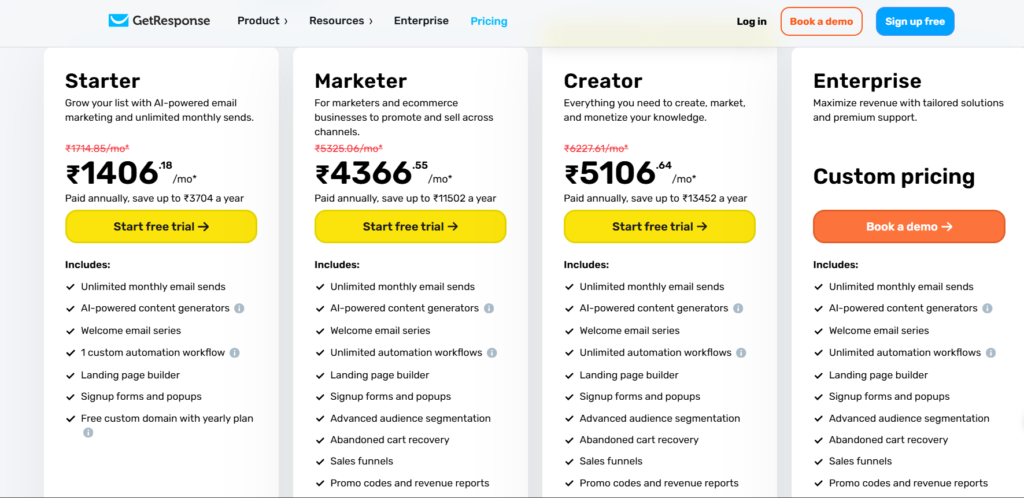
GetResponse uses a tiered pricing structure where the cost increases based on the plan you choose and the size of your contact list. There’s also a 14-day free trial so you can try premium features before committing.
Here’s a breakdown of the most common GetResponse plans:
1. Free Plan
GetResponse offers a free plan for users with smaller lists, usually up to ~500 subscribers. It includes basic tools like email sending and forms, though with some feature limitations compared to paid plans.
2. Starter Plan
- Starts at about $19/month for up to 1,000 contacts (billed monthly).
- Includes unlimited email sends, basic autoresponders, landing pages, and signup forms.
- Great for small businesses or beginners who are focusing mainly on email marketing.
3. Marketer Plan
- Starts around $59/month for up to 1,000 contacts.
- Adds unlimited automation workflows, advanced audience segmentation, abandoned cart recovery, and sales funnels.
- Best for businesses looking to grow with automation and e-commerce features.
4. Creator Plan
- Starts at about $69/month for up to 1,000 contacts.
- Includes everything in Marketer plus tools for webinars, course creation, website building, and monetization.
- Ideal for creators, online course sellers, and content businesses.
5. Enterprise Plan
- Customized pricing for large lists (above ~100,000 contacts) and advanced business needs.
- Includes priority support, advanced tools, and additional scalability options.
Contact Count Affects Cost
GetResponse pricing increases with your list size. For example, keeping lists at 2,500 or 10,000 contacts means higher monthly fees—something to consider as your business grows.
In the GetResponse vs ActiveCampaign pricing comparison, GetResponse generally has lower entry costs and built-in tools like landing pages and funnels that might cost extra elsewhere.
Customer Support and Learning Resources
In the GetResponse vs ActiveCampaign comparison, customer support and learning resources are important because they directly affect how quickly you can solve issues and make full use of the platform.
GetResponse offers reliable customer support through live chat and email. The platform also provides a large knowledge base that includes step-by-step guides, video tutorials, webinars, and onboarding materials. These resources are especially helpful for beginners who want to learn email marketing and automation without feeling overwhelmed.
ActiveCampaign provides multiple support options as well, including live chat and email support. In addition, it offers a more advanced learning ecosystem with in-depth documentation, training courses, webinars, and use-case-based guides. ActiveCampaign’s resources are particularly useful for users who want to master complex automation and CRM features.
Key differences in support and learning:
- GetResponse focuses on beginner-friendly guidance and fast support
- ActiveCampaign offers advanced training for power users
In the GetResponse vs ActiveCampaign support comparison:
- GetResponse is ideal for new users and small teams needing quick help
- ActiveCampaign is better for experienced marketers looking for deep learning resources
Both platforms provide strong support, but the best choice depends on how much guidance and technical depth you need.
Scalability for Growing Businesses
In the GetResponse vs ActiveCampaign comparison, scalability is important for businesses that plan to grow their audience, campaigns, and revenue over time.
GetResponse scales well for small to mid-sized businesses. As your email list grows, you can upgrade plans to unlock more automation features, advanced segmentation, and higher sending limits. The platform remains easy to manage even with larger lists, making it a good option for businesses that want growth without added complexity.
ActiveCampaign is built with long-term scalability in mind. It is designed to handle large contact lists, complex automations, and sales pipelines without performance issues. As businesses grow, ActiveCampaign allows deeper customization, CRM expansion, and advanced automation logic, making it suitable for companies with evolving marketing and sales processes.
Key scalability differences:
- GetResponse is ideal for steady, predictable growth
- ActiveCampaign supports rapid scaling and complex operations
In the GetResponse vs ActiveCampaign scalability comparison:
- GetResponse works best for small businesses and growing online brands
- ActiveCampaign is better suited for fast-growing companies, agencies, and B2B teams
If you want a platform that grows with you while staying simple, GetResponse is a strong choice. If your business expects rapid expansion and needs advanced systems, ActiveCampaign offers greater long-term flexibility.
Pros and Cons of GetResponse
In the GetResponse vs ActiveCampaign comparison, GetResponse stands out as an all-in-one marketing platform that focuses on simplicity, affordability, and ease of use. Below is a clear look at its strengths and limitations.
Pros of GetResponse
- Easy to use interface
GetResponse is beginner-friendly, with a clean dashboard and intuitive drag-and-drop editors for emails, landing pages, and automation. - All-in-one marketing tools
It includes email marketing, automation, landing pages, forms, webinars, and conversion funnels in one platform. - Affordable pricing
Compared to ActiveCampaign, GetResponse offers better value at lower price points, including a free plan for beginners. - Built-in landing pages and funnels
Unlike many competitors, GetResponse lets you create full marketing funnels without third-party tools. - Reliable email deliverability
Strong deliverability tools help ensure emails reach inboxes consistently.
Cons of GetResponse
- Limited CRM features
The built-in CRM is basic compared to ActiveCampaign’s advanced sales pipeline and deal management system. - Less advanced automation
While powerful enough for most users, automation options are not as deep or flexible as ActiveCampaign’s. - Fewer native integrations
Some integrations require third-party tools like Zapier.
In the GetResponse vs ActiveCampaign comparison, GetResponse is best for users who want a simple, affordable, and all-in-one email marketing solution without needing advanced CRM or complex automation.
Pros and Cons of ActiveCampaign
In the GetResponse vs ActiveCampaign comparison, ActiveCampaign is known for its powerful automation and advanced CRM features. It is designed for businesses that need deep customization and data-driven marketing.
Pros of ActiveCampaign
- Industry-leading marketing automation
ActiveCampaign offers one of the most advanced automation builders available, with detailed triggers, conditions, and actions. - Full-featured built-in CRM
It includes sales pipelines, deal tracking, lead scoring, tasks, and notes, making it ideal for sales-focused teams. - Advanced segmentation and personalization
Users can create highly targeted campaigns based on detailed behavioral and CRM data. - Large integration ecosystem
ActiveCampaign integrates with a wide range of third-party tools and platforms. - Strong analytics and reporting
Detailed reports help track performance across emails, automations, and sales funnels.
Cons of ActiveCampaign
- Steeper learning curve
The platform can feel overwhelming for beginners due to its depth and complexity. - Higher pricing
ActiveCampaign is more expensive than GetResponse, especially as your contact list grows. - No built-in landing page builder
Users often need third-party tools to create full landing pages.
In the GetResponse vs ActiveCampaign comparison, ActiveCampaign is best suited for businesses that need advanced automation, CRM functionality, and long-term scalability, even if it requires more time and budget.
Conclusion and Final Thoughts: Our Verdict
Choosing between GetResponse vs ActiveCampaign ultimately comes down to your business needs, experience level, and long-term goals.
GetResponse is an excellent choice if you want a simple, affordable, and all-in-one email marketing platform. It works especially well for beginners, small businesses, bloggers, and creators who want to launch campaigns quickly without dealing with complex setups.
ActiveCampaign, on the other hand, is built for businesses that need advanced automation, deep segmentation, and a full CRM system. If your marketing strategy relies heavily on data, behavior-based targeting, and sales pipelines, ActiveCampaign offers the flexibility and power to support that growth.
Both tools are reliable, widely used, and capable of delivering strong results when used correctly. There is no wrong choice—only the right tool for your specific situation.
Final takeaway:
If you value ease of use and value for money, go with GetResponse.
If you need advanced automation and CRM-driven marketing, ActiveCampaign is the better fit.
Whichever platform you choose in the GetResponse vs ActiveCampaign comparison, focusing on quality content, clean email lists, and consistent optimization will matter more than the tool itself.